

How Freelancers Can Send Professional Invoices Without Paying for Software: Freelancers live and die by their invoices. You finish the work, you send the bill, and you wait to get paid. It sounds simple. Yet many freelancers still send messy invoices made in a word processor, or worse, a plain email with a price and hope for the best.
Why a Professional Invoice Matters
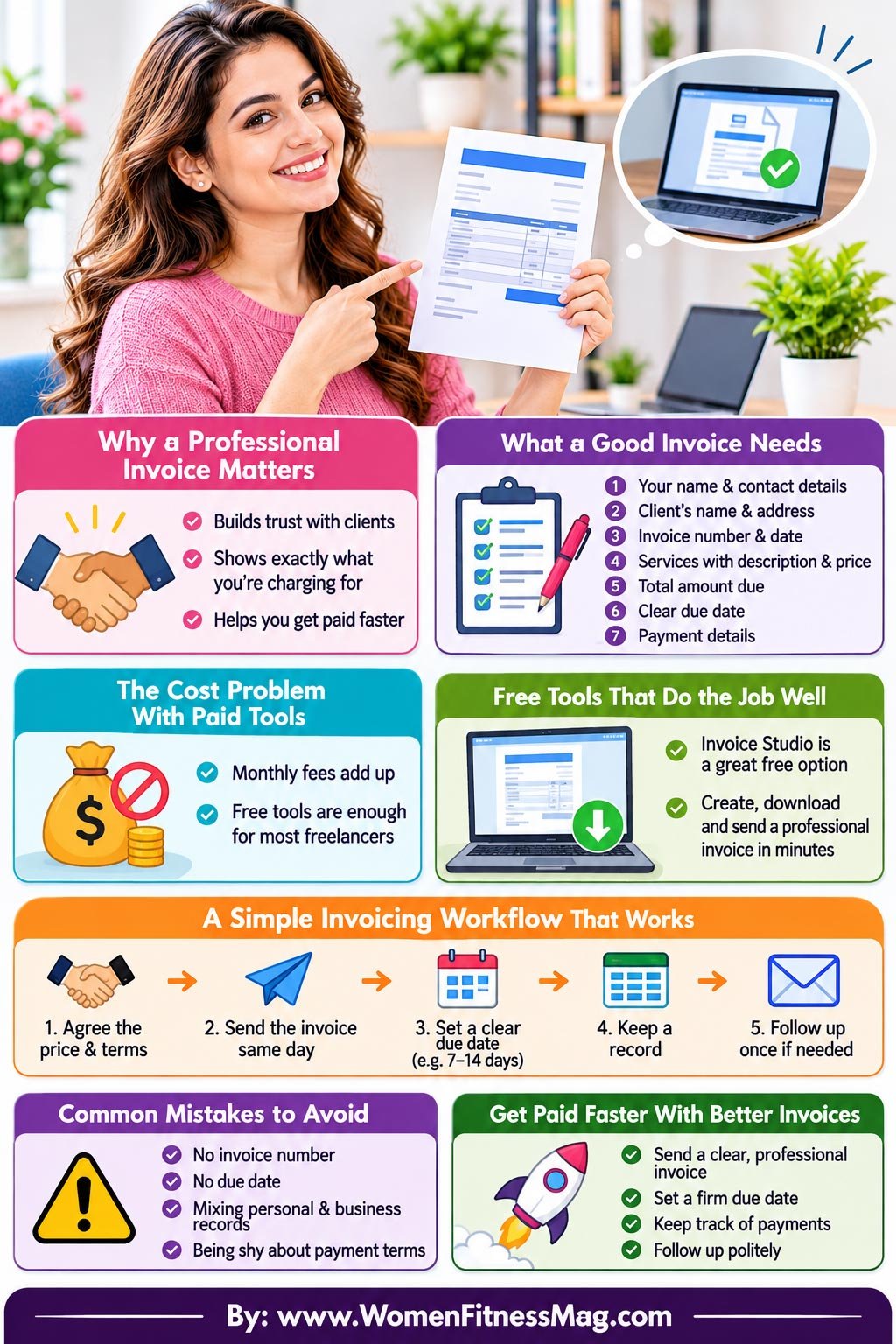
An invoice is more than a request for money. It is a record of the work you did and the terms you agreed with your client. When a client sees a clear invoice, they trust you more. They know exactly what they are paying for. They see the due date. They see how to pay. That clarity removes friction, and less friction means faster payment.
A sloppy invoice does the opposite. If the client cannot tell what the charge covers, they will ask questions. Every question delays payment by a day or two. If the invoice has no due date, the client has no reason to pay this week. If it has no payment details, the client has to email you to ask. Each small gap adds delay. Over a year, those delays add up to real money sitting in other people’s accounts instead of yours.
What a Good Invoice Needs
A professional invoice does not need to be fancy. It needs a few basic parts, and every one of them has a job to do. First, put your name or business name at the top, plus your contact details. Second, add the client’s name and address. Third, give the invoice a unique number and a date. Fourth, list each service you provided, with a short description and the price. Fifth, show the total amount due. Sixth, state the due date in plain words. Seventh, include your payment details, such as a bank account or payment link.
That is all. Seven parts, and the invoice does its job. You do not need a logo to look professional, though a simple one helps. You do not need legal language. You need clarity. A client should understand the invoice in ten seconds.
The Cost Problem With Paid Tools
Many invoicing tools charge a monthly fee. The fee may look small, maybe ten or twenty dollars a month. But for a freelancer who is just starting out, or for one with a slow month, that fee still comes out every month. Over a year it becomes hundreds of dollars.
This is why free tools matter. A free invoicing tool that covers the basics is enough for most freelancers. You need to create an invoice, save it, download it as a PDF, and send it. You need to keep a record of what you sent. That is the core job. Anything beyond that is a bonus, not a need.
Free Tools That Do the Job Well
There are several free invoicing tools online. The best ones run in your browser, so you do not need to install anything. You open the tool, fill in your details, and download a clean PDF. Some let you add your logo and pick a currency. Some keep your past invoices so you can find them later.
One option worth trying is Invoice Studio. It is a free tool that lets you build a professional invoice in minutes. You add your business details, your client details, and your line items. Then you download the finished invoice as a PDF and send it to your client. There is no signup wall in the way, and no monthly fee. For a freelancer who sends a few invoices a month, that is all you need. If you want to read more about the basics, this invoice guide covers the standard parts in detail.
When you compare free tools, check three things. First, can you download the invoice as a PDF? Second, can you add your own currency and tax details? Third, does it save your work so you do not have to retype your details every time? If the answer is yes to all three, the tool is good enough.
A Simple Invoicing Workflow That Works
A tool alone will not get you paid on time. You need a small routine around it. Start by agreeing the price and the payment terms before you begin the work. Put that agreement in an email so both sides can see it. This takes two minutes and prevents most disputes later.
Next, send the invoice the same day you finish the work. Do not wait until the end of the week. The sooner the client gets the invoice, the sooner they pay.
Then, set a clear due date. Seven or fourteen days is normal for freelance work. Write the date on the invoice in full, for example “Due on 5 December 2026”. Do not write “due soon” or “pay when you can”. Vague words invite vague payment.
After that, keep a simple record. A spreadsheet works fine. Write down the invoice number, the client, the amount, the date sent, and the date paid. When a payment is late, you will know at once, and you will have the facts to follow up politely.
Finally, follow up once. If the due date passes and there is no payment, send a short polite reminder. Most late payments are not a refusal. The client forgot, or the invoice got buried in their inbox. One reminder solves most cases.
Common Mistakes to Avoid
The first mistake is sending an invoice with no number. Numbers help you track payments and help the client match your invoice to their records. Start at 001 and go up from there.
The second mistake is forgetting the due date. Without a due date, the client decides when to pay, and that is usually later than you want.
The third mistake is mixing personal and business records. Keep your invoices in one place. If you use a free tool that stores them, use it every time. Do not create some invoices in one app and others in a document. You will lose track.
The fourth mistake is being shy about payment terms. It is normal to ask for a deposit before you start, often 50 percent. It is normal to charge a late fee if the client agrees to it in advance. Professional clients expect this. It is part of doing business.
Get Paid Faster With Better Invoices
You do not need to spend money to look professional. You need a clear invoice, a simple routine, and a free tool that does the basics well. Start with your next project. Agree the terms in writing. Send the invoice the day the work is done. Set a clear due date. Keep a record. Follow up once if needed.
Freelancing is a business, and invoicing is the part of the business that turns work into income. Treat it with the same care you give your craft, and you will spend less time chasing payments and more time doing the work you enjoy.
Related Infographics: